


Hello Everybody!!!!
Hope you have liked my previous post of about Fake Mailing(.....) Today I am going to post something useful for my readers for faster shutting and rebooting of your processor. The trick is although very simple and easy to use but still it is highly recommended for faster computing. After successful completion of this trick there will be two shortcuts in your desktop with the help of which you can shutdown or reboot your computer more faster than ever.


I will discuss this trick in two ways..first is
THE EASY WAY
and the second one is
THE HARD WAY
or
THE STYLISH WAY.
In the easy way the trick will be completed easily without advanced customization while in the hard way the steps are bit longer but with advanced and cool customization
Here is how the tricks goes !!!!

First, create a shortcut on your desktop by right-clicking on the desktop, choosing New, and then choosing Shortcut.

The Create Shortcut Wizard appears. In the box asking for the location of the shortcut, type shutdown
and then click Next

After that in the next window choose any name for your shortcut ,For example " shutdown " and
then click finish.
After you create the shortcut, double-clicking on it will shut down your PC.
Also, see the below method by which you can shutdown your computer with highly advanced customization.


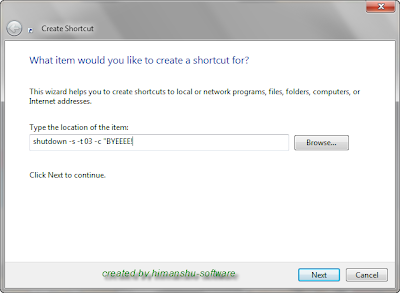

1st Step:
As like the easy way first step, create a shortcut on your desktop by right-clicking on the desktop, choosing New, and then choosing Shortcut.

2nd Step:
Then the Create Shortcut Wizard appears. In the box asking for the location of the shortcut, type
shutdown -s -t 03 -c "BYEEEE!" ( in bold ) and after that click next.
shutdown -s -t 03 -c "BYEEEE!" ( in bold ) and after that click next.
3rd Step:
Then type shutdown or any name of your choice and click finish.


;Double click on the shortcut ....! and see what happens
I use this technique to create two shutdown shortcuts on my desktop—one for turning off my PC, and one for rebooting.
Here are the ones I use:
Here are the ones I use:
shutdown -s -t 03 -c "SHUTDOWN TRICK created by himanshu-software!"
Double-clicking on that shortcut will shutdown your PC after a three-second delay and display the message "sHUTDOWN TRICK created by himanshu-software!"
shutdown -r -t 01 -c "REBOOTING TRICK created by himanshu-software"
Double-clicking on that shortcut will reboot your PC after a one-second delay and display the message "REBOOTING TRICK created by himanshu-software"
The shutdown command includes a variety of switches you can use to customize it. See below :

 Changing Shortcut Key of the Shortcut:
Also see :
Stop a Shutdown or Reboot Process
Please pass a comment if you have any problem regarding this trick
Double-clicking on that shortcut will shutdown your PC after a three-second delay and display the message "sHUTDOWN TRICK created by himanshu-software!"
shutdown -r -t 01 -c "REBOOTING TRICK created by himanshu-software"
Double-clicking on that shortcut will reboot your PC after a one-second delay and display the message "REBOOTING TRICK created by himanshu-software"
The shutdown command includes a variety of switches you can use to customize it. See below :
-s
-t
-c "messagetext"
-f
-r
Shuts down the PC.
-t
Indicates the duration of delay, in seconds, before performing the action.
-c "messagetext"
Displays a message in the System Shutdown window. A maximum of 127 characters can be used. The message must be enclosed in quotation marks.
-f
Forces any running applications to shut down.
-r
Reboots the PC.
Extra Tips and tricks

Changing Icon :
To change the icon of the shortcut go to the properties of the shortcuts and then click the Shortcut Tab
After that click on Change Icon....there you will see that a new window get opens with many icons. Choose
your icon nd then click OK and then click apply and lo there your icon gets changed
After that click on Change Icon....there you will see that a new window get opens with many icons. Choose
your icon nd then click OK and then click apply and lo there your icon gets changed
 Changing Shortcut Key of the Shortcut:
This is the most important part of this trick. After completion of this trick you can shutdown or reboot your computer
with the help of few key strokes. For this trick firstly go to the properties of the shortcuts and then click the Shortcut Tab
After that you will see a Shortcut Key tab. Enter your choiced keystrokes there like I have applied Ctrl + Alt + 3, now whenever you have to run this shortcut just enter that keystroke or shortcut key
with the help of few key strokes. For this trick firstly go to the properties of the shortcuts and then click the Shortcut Tab
After that you will see a Shortcut Key tab. Enter your choiced keystrokes there like I have applied Ctrl + Alt + 3, now whenever you have to run this shortcut just enter that keystroke or shortcut key
Thats it!! after a successful completion of this trick through the
hard way you will see a message like below after dobule clicking the shortcut button.
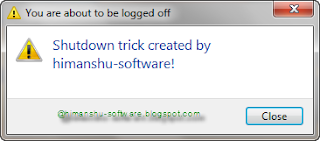
hard way you will see a message like below after dobule clicking the shortcut button.

Also see :
Stop a Shutdown or Reboot Process
Please pass a comment if you have any problem regarding this trick


