Liked us?

d

Welcome to This Blog

Hello and welcome everyone to this blog.Here you can get wonderful computer tricks and tweakz .Also I will provide you freebies time to time so just seat back and explore this blog.......

Make your own virus - DELmE's Batch Virus Maker

Hackforums.net has made a virus generator program with the use of it you can make your own virus..........thes virus are so dangerous that it can destroy your whole PC so I warn you use this program at your own risk.But thes program is best to destroy your enemy's computer,If you want to know how a virus is made then these programme is best for you

Making a dangerous virus -Matrix !!!!! For EDUCATIONAL PURPOSE ONLY

This virus will wipe out your whole HD using an animation of 10secs, it will also use your IP to harm you and your isp (not bad in my case tongue.gif ) and spread to all your contacts...

How to create a fake error message-mostly for windows

With this help of this page you will know come to know how to create a fake error message which works mostly for windows

Windows explorer shortcuts

In this page you will came to know about the windows explorer shortcuts which will help you in using your computer faster

Annoying Google - Google hacks

In this trick the capitalisation of your searches will change automatically.Some words will change into small letter and some into capital letters in your search result.Also there will be the change of logo as you can see in the picture

Showing posts with label add Notepad to send to. Show all posts

Add Notepad to Send to Menu - For Windows 7 only { Updated } 0

Coder Himanshu | Sunday, April 10, 2011 | , ,

Have you ever wondered how to add any programme to send to menu in windows 7.Here is the answer as today I will tell you how to add Notepad to Send to Menu. But of course you can add any programme to send to menu. But for  example I am taking Notepad
This trick is all made by me with a mindset that it should be so simple that it could  even be use easily by a kid. Due to this you can open any file to notepad without dragging the file.

1st Step:
First Right click > New > Shortcut


2nd Step:
Then type their " Notepad " without quotes and click next

3rd Step:
And in the next screen type Edit with Notepad or whatever you wish and then click finish

 
4th Step :
Then copy the Shortcut

5th Step :
Then go to C:\Users\ ( your username )\AppData\Roaming\Microsoft\Windows\SendTo and paste the Shortcut
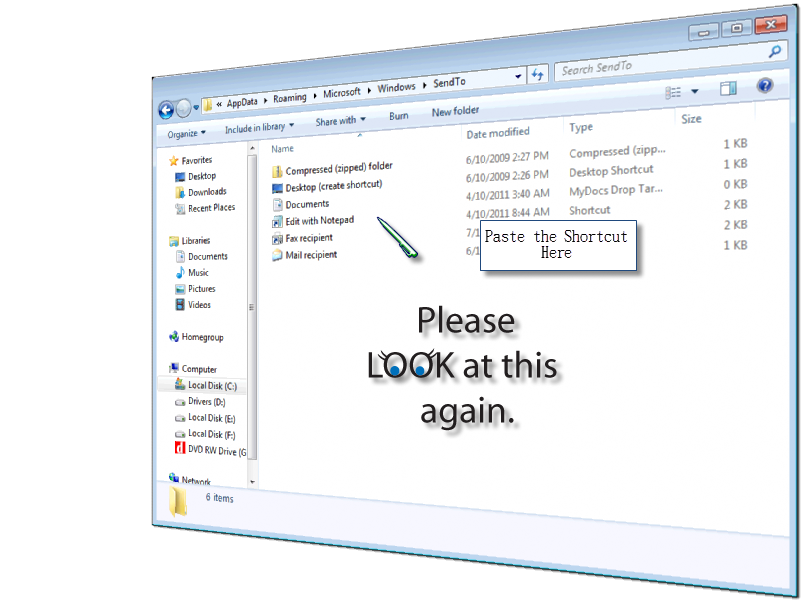

Alassss.......now right click any program and the go to Send to you will find Edit with notepad caption [as you can  see the picture below] ...click that and the program will open with notepad


!!!!NOTICE!!!!

 
First you must see that you have enabled " Show hidden file and folder " as Appdata is a Hidden folder...If you don't know how to view hidden file and folder please visit this link (...)


I will also tell my reader how to add notepad in Send To menu iin Windows XP  very soon.............Till then keep visiting this Site


undefined: undefined »