


I hope you have like my post about Resource Hacker with the help of which you can modify many type of file.As modifying of system file and then customizing is very cool so all of us starts to use Resource Hacker very frequently.But it is too tiring to drag the file to Resource hacker or browsing the file through Resource hacker.
So to solve this problem I will tell you about a wonderful trick by which you can add Resource Hacker or any other programme in context menu send to of Windows Xp and modify system file the easy way.
1: First Right click > New > Shortcut

2: Then navigate to the location where you had kept Resource Hacker and click next

3: After that enter "Open with Hacker" without quotes or any desired name of your choice and then click finish

4:Next......Go to C:\Users\ {your username}\Sendto and past the shortcut there

And......if you have done everything correctly you will have this new send to menu shown below
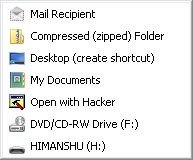
NOTE:---- Never delete or move the resource hacker file that you have use to make the shortcut
Caution: The folder sendto might be hidden so to know how to unhide a folder visit here (...)
Additionally If you want to know how to add Resource Hacker to sendto menu in windows 7 please visit here(...)
If you have any problem or for feedback please comment below undefined: undefined »
So to solve this problem I will tell you about a wonderful trick by which you can add Resource Hacker or any other programme in context menu send to of Windows Xp and modify system file the easy way.
1: First Right click > New > Shortcut
2: Then navigate to the location where you had kept Resource Hacker and click next

3: After that enter "Open with Hacker" without quotes or any desired name of your choice and then click finish

4:Next......Go to C:\Users\ {your username}\Sendto and past the shortcut there

And......if you have done everything correctly you will have this new send to menu shown below
NOTE:---- Never delete or move the resource hacker file that you have use to make the shortcut
Caution: The folder sendto might be hidden so to know how to unhide a folder visit here (...)
Additionally If you want to know how to add Resource Hacker to sendto menu in windows 7 please visit here(...)
If you have any problem or for feedback please comment below undefined: undefined »


